
In addition to the statistics available in the Enterprise Hub, Brain users can track the performance of individual templates. This helps you tailor future templates based on what’s most effective for your advisors.
How to View Statistics
Log in to your Brain account.
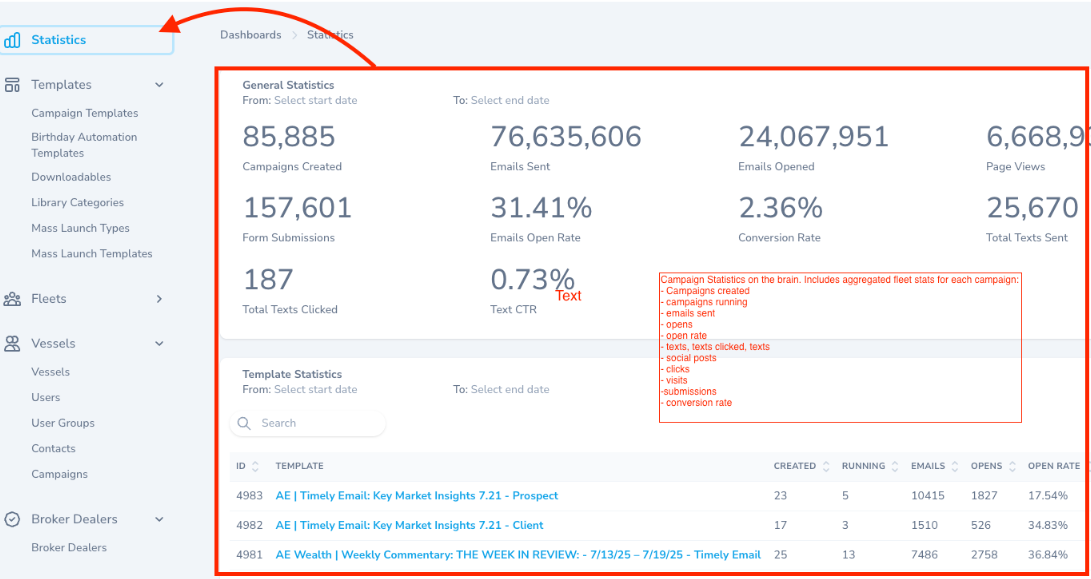
If you have access, you’ll see the Statistics menu in the top right corner — click this.
You’ll see a general overview as well as detailed statistics for each template.
Use the date range selector to filter the data. All results shown will reflect your fleet only.
Understanding the Data
General Statistics
Campaigns Created: Total number of campaigns created from all your templates.
Form Submissions: Number of forms submitted across your fleet.
Emails Sent: Total emails sent from campaigns launched across your fleet.
Page Views: Total visits to landing pages from launched campaigns.
Email Open Rate: Overall open rate for all template emails across your fleet.
Total Texts Sent: Number of text messages sent via Convos from launched campaigns.
Total Texts Clicked: Number of texts opened by contacts.
Text CTR: Click-through rate for Convos text messages.
Template Statistics
ID: Template ID.
Template: Template name.
Created: Number of campaigns created using that template.
Running: Number of campaigns currently running or launched with that template.
Email: Total emails sent for campaigns using that template.
Open: Total emails opened for campaigns using that template.
Open Rate: Percentage of opened emails for that template.
Texts: Total text messages sent for that template’s campaigns.
Texts Clicked: Number of texts opened by contacts.
Text CTR: Click-through rate for Convos texts sent from that template.
Social Posts: Total social posts sent using that template (LinkedIn, Facebook, and X [formerly Twitter]).
Clicks: Total clicks on all social posts for that template.
Visits: Landing page visits for campaigns using that template.
Submissions: Total form submissions for campaigns using that template.
Conversion Rate: Percentage of page visitors who submitted the form.
Tip: Use these insights to refine your templates and boost results for your advisors.