
The Template Pre-Approval workflow makes it easy for firms to streamline compliance. You can submit a campaign template once for broker-dealer review and, once approved, any advisor in your organization can use it—no need for repeat reviews unless the content is modified.
I. Submitting a Template from the Campaigns Product
Log into the Brain via:
https://auth.snappykraken.app/enterprise?novaNavigate to the Campaigns product and choose the template you want to submit.
From the template view, click Submit for Pre-Approval.
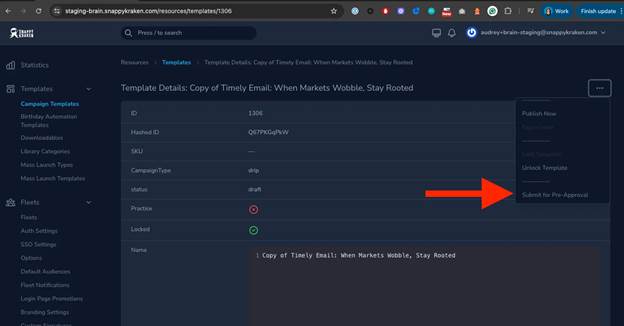
A modal will appear listing broker-dealers connected to your fleet.
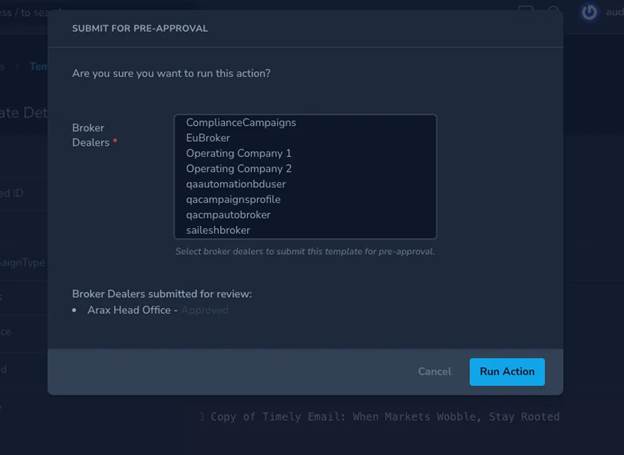
Select one or more broker-dealers you’d like to send the template to.
Only broker-dealers linked to the compliance dashboard will appear.
Click Submit to send the request.
After submission, scroll to the bottom of the template page to check status in the Template Pre-Approvals section.
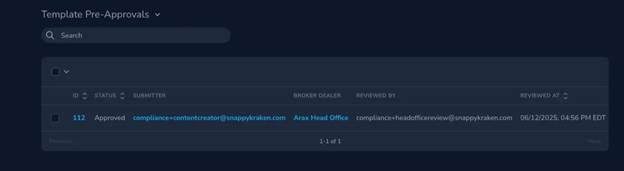
II. What Happens After Submission
Your broker-dealer will receive the request in their Compliance Dashboard under the Template Review section.
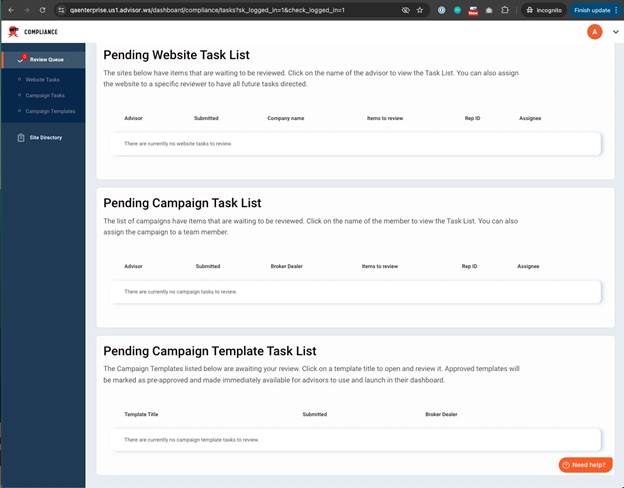
A PDF preview of the template is automatically generated.
The Compliance Officer can choose to:
✅ Approve the template
❌ Reject the template
Comment with suggested changes
III. After Approval
✅ Once approved:
The template is locked for edits.
Advisors can launch campaigns using it without needing another compliance review.
Note: Once advisors personalize the campaign and make changes to it, the campaign itself will require approval before launch.
⚠️ If edits are made:
The template must be unlocked and resubmitted.
Unlocking voids previous approvals and starts a new review cycle.
❌ If rejected:
The template cannot be resubmitted in its current form.
A new version must be created and submitted.
IV. Good to Know
Templates are reviewed once per broker-dealer, not per advisor.
Duplicate submissions to the same broker-dealer are not allowed.
Email notifications are sent to you and your team as templates move through each review stage.
Need Help?
If you're having trouble submitting a template or tracking a request, reach out to our support team—we’re happy to help!