
The Brain allows you access to different admin areas depending on the role assigned to your user profile. This article explains the common enterprise roles and what each role can typically access.
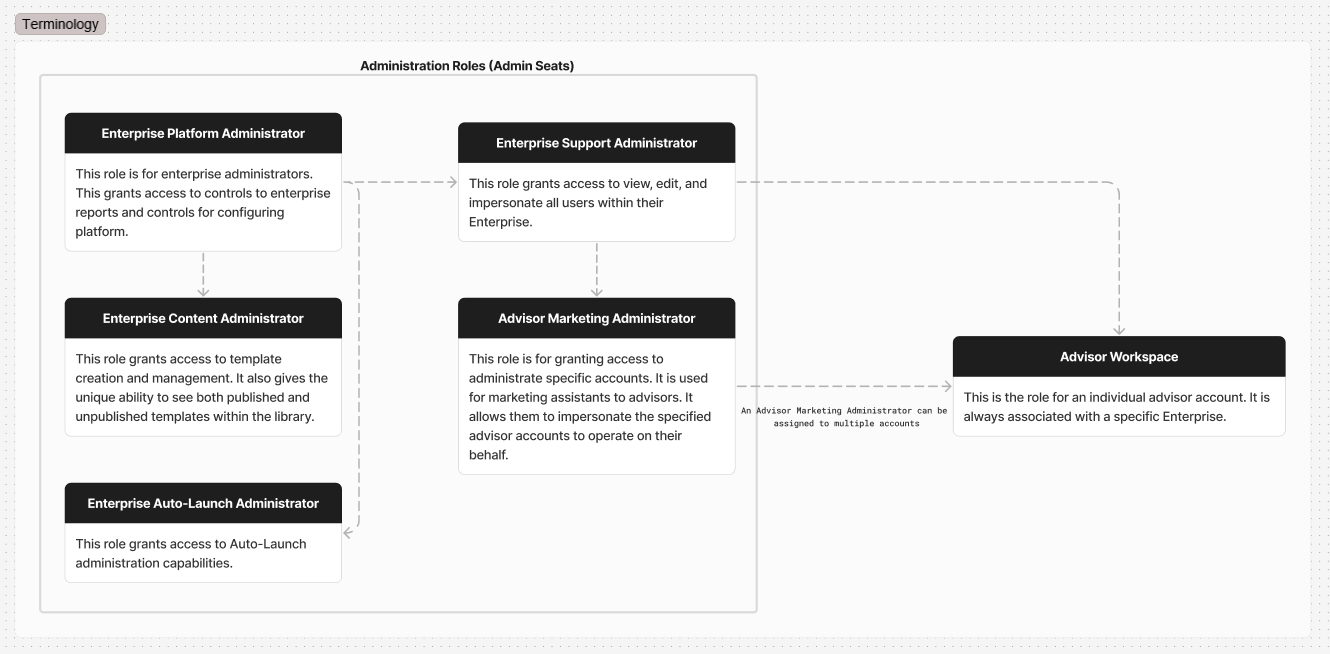
Firm Level User Roles
Advisor Workspace
An Advisor Workspace is the dedicated account for an individual advisor and is also the user role assigned to the account in The Brain. It is designed for a single primary user so the user role can only be associated with one Advisor Workspace user per account. If additional team members need access to manage the account, they can be granted access using the Advisor Marketing Administrator role.
Advisor Marketing Administrator
An Advisor Marketing Administrator can access specific Advisor Workspaces within the enterprise platform. This role is ideal for marketing assistants or other support staff who manage one or more advisor accounts without requiring full Enterprise Administrator permissions.
Advisor Marketing Administrators can impersonate assigned advisor accounts, allowing them to perform tasks and manage marketing activities on the advisor's behalf.
Convos Marketing Administrator
Convos Marketing Administrators have access to view and send messages through the advisor’s Convos account. This role is ideal for marketing assistants or other support staff who manage the Convos product on behalf of the advisor.
Enterprise Level User Roles
Enterprise Platform Administrator
Enterprise Platform Administrators have the broadest enterprise-level access. Users with this role can access enterprise reporting, users and configuration controls for their entire Enterprise platform. This role cannot create additional Enterprise Platform Administrators, but it can assign other roles.
Enterprise Support Administrator
Enterprise Support Administrators have access to all users within their Enterprise. They can view, edit, and impersonate user accounts, making this role ideal for marketing administrators who manage and support advisor accounts across the entire Enterprise.
Enterprise Content Administrator
Enterprise Content Administrators focus on campaign template creation and management. Users with this role have the unique ability to see both published and unpublished templates within the library.
Enterprise Auto-Launch Administrator
Enterprise Auto-Launch Administrators have access to Auto-Launch capabilities such as template creation.
Role Permissions Overview
The table below summarizes the most common areas each enterprise admin role can access.
Many admin areas are limited to your enterprise. In the table below, “full access” means you can only view or manage records connected to the enterprise your user account belongs to.
| Area | Enterprise Platform Administrator | Enterprise Content Administrator | Enterprise Support Administrator | Enterprise Auto-Launch Administrator | Advisor Marketing Administrator |
|---|---|---|---|---|---|
| Statistics | Full access | Full access | Full access | Full access | No access |
| Campaign templates | Full access | Full access | No access | View & edit; no delete | No access |
| Birthday automation templates | Full access | Full access | No access | View & edit; no delete | No access |
| Downloadables | Full access | Full access | No access | View & edit; no delete | No access |
| Library categories | Full access | Full access | No access | No access | No access |
| Auto-Launch types | Full access | Full access | No access | Full access | No access |
| Auto-Launch templates | Full access | Full access | No access | View & edit; no delete | No access |
| Enterprise settings | View & edit | Limited file access only | No access | No access | No access |
| Advisor workspaces | Full access | No access | View, edit, delete, and restore | No access | No access |
| Users | Full access | No access | View, edit, delete, and restore | No access | View only (limited) |
| User groups | Full access | View + add/remove members | View + add/remove members | No access | No access |
| Contacts | Full access | No access | View, edit, delete, and restore | No access | No access |
| Campaigns | Full access | No access | View, edit, delete, and restore | View only | No access |
Need a different level of access?
If you need access to additional advisors, sections, or tools, ask an enterprise platform administrator to review your assigned role and (if applicable) which advisor workspaces you’re allowed to manage.